Dropbox or Drive?
Built for documents, not 4 TB projects. Premiere has to download the whole thing before it’ll even play a frame.
Swarmfile is one shared drive for projects too big to sync. Open a 4 TB file in seconds - from any office in the world.
Free for 7 days · cancel anytime · nothing charged until day 7.
Running in production from 22-seat studios to 2,000-seat firms - post, architecture, and construction.
Fast is the easy part. The reason you can’t run without Swarmfile is that your work can’t be lost, corrupted, held hostage, stolen, or stuck.
A laptop dies or a drive fails - and your project doesn’t even notice. Every file lives in the cloud and on every machine that’s touched it. Lose one; lose nothing.
The moment something starts overwriting your files, Swarmfile quarantines it. Roll the project back to this morning - and lock the attacker out.
Every change is versioned and attributed. See who touched a file and when, roll a bad change back in one click, and branch to try a variant without touching the master. No more “final_v3_REAL”.
Every file is encrypted at rest, on every tier. Turn on end-to-end and not even we can see it. Pre-release IP passes the security review.
Every block is checked byte-for-byte, so a bad drive or a flaky network can never sneak corruption into your project. No glitched frames, no “the file won’t open”.
Open a 4 TB project in seconds, from anywhere. The whole office shares one cloud fetch, not one per editor. No downloads, no syncs, no drives in the mail.
Your whole project shows up as a normal drive. Browse 10,000 files - nothing lands on your disk.
Open a file and only the bytes your app actually reads stream in - never the whole thing. Seconds, not hours.
The first person to open a file warms it for everyone. The next gets it from them - not the cloud.
One fetch per office - not per editor. The cloud lights up once; the LAN serves everyone else.

VFX, post, color and audio. A 4 TB Resolve or Premiere project opens instantly - in the studio, at home, or across two continents. The colorist in Berlin scrubs the cut the editor in LA just saved.
Explore for Media →
Civil, survey and drone-mapping. Stream only the tile you’re looking at - the rest never touches your disk.
Explore for Geospatial →
Architecture, MEP and structural. File locking, full history, audit trail. Revit worksharing is on the roadmap.
Explore for AEC →You don’t need a team to need Swarmfile. Mount a bottomless drive for projects bigger than your disk, open a 200 GB file without downloading it, and roll back to any past save. Starter starts at a single seat - $5 / month.
The four things teams try first - and where each one breaks on a 4 TB project.
Built for documents, not 4 TB projects. Premiere has to download the whole thing before it’ll even play a frame.
Great in the office, painful from home, dead when the connection drops. And you paid for all the hardware.
Cheap - until you count the courier, the two-day wait, and the editor working from last week’s copy.
The closest thing to us - but it fetches everything from the cloud. Every editor in the room pays the same round-trip. We serve the office once, then share it over the LAN.
See the full comparison →Browse 10,000 files in a 4 TB project without downloading a single one.
A multi-terabyte project mounts instantly. Directory listings are sub-millisecond.
LA opens what Berlin just saved. No courier, no two-day wait, no stale copies.
The power teams switch to Perforce for - branch, commit, merge - built into a drive you just mount. No repo to clone, no checkout dance, nothing new for your editors to learn. It’s there when you need it, invisible when you don’t.
Fork a whole project to try a look-dev variant or a design option - instantly, without copying a terabyte. Each workstation works its own branch over the same shared blocks.
Group a multi-file change into one named, atomic commit. See the full history, and revert an entire changeset in one move - not file by file.
Land your branch onto main with a whole-file merge and conflict detection. Binaries are winner-take-all - you pick which wins, never a silent clobber.
Perforce-grade control for the files git was never built for - and your editors never have to think about it. See how it works →
See it in action
Watch the actual engine open a 200 GB file instantly, stream only the bytes you read, and keep working when a peer dies or the hub goes offline. Unedited terminal captures - scrub them, replay them, copy the commands.
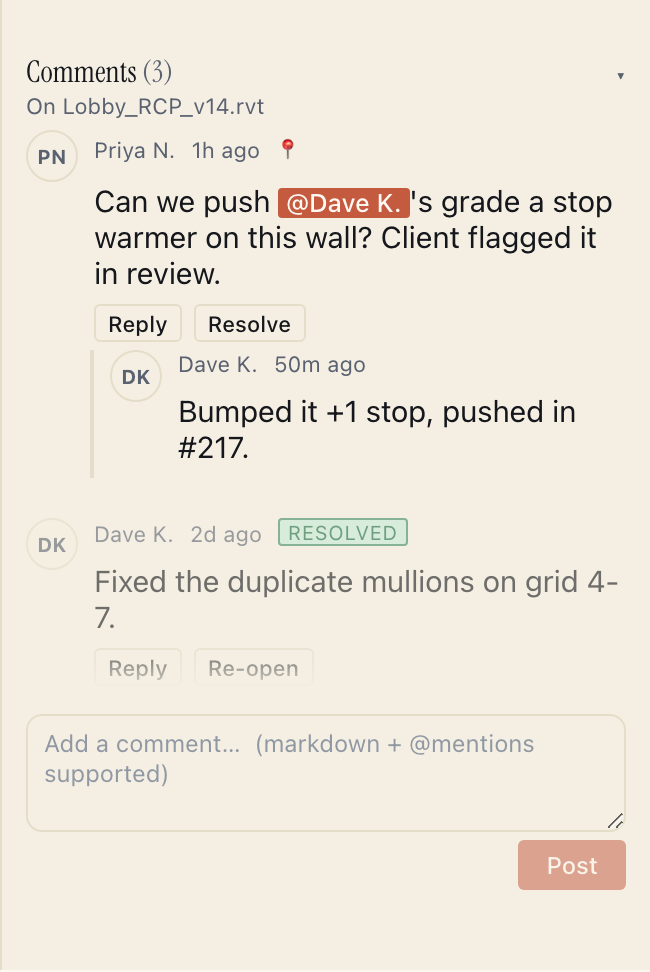
Review on the drive
Comment on any file and @-mention a teammate - internal or a guest reviewer - right where it lives. Resolve threads, reply inline, and pin a note to a spot on the file. No round-trip to email, Slack, or a separate review tool, and nothing to export before a client can weigh in.
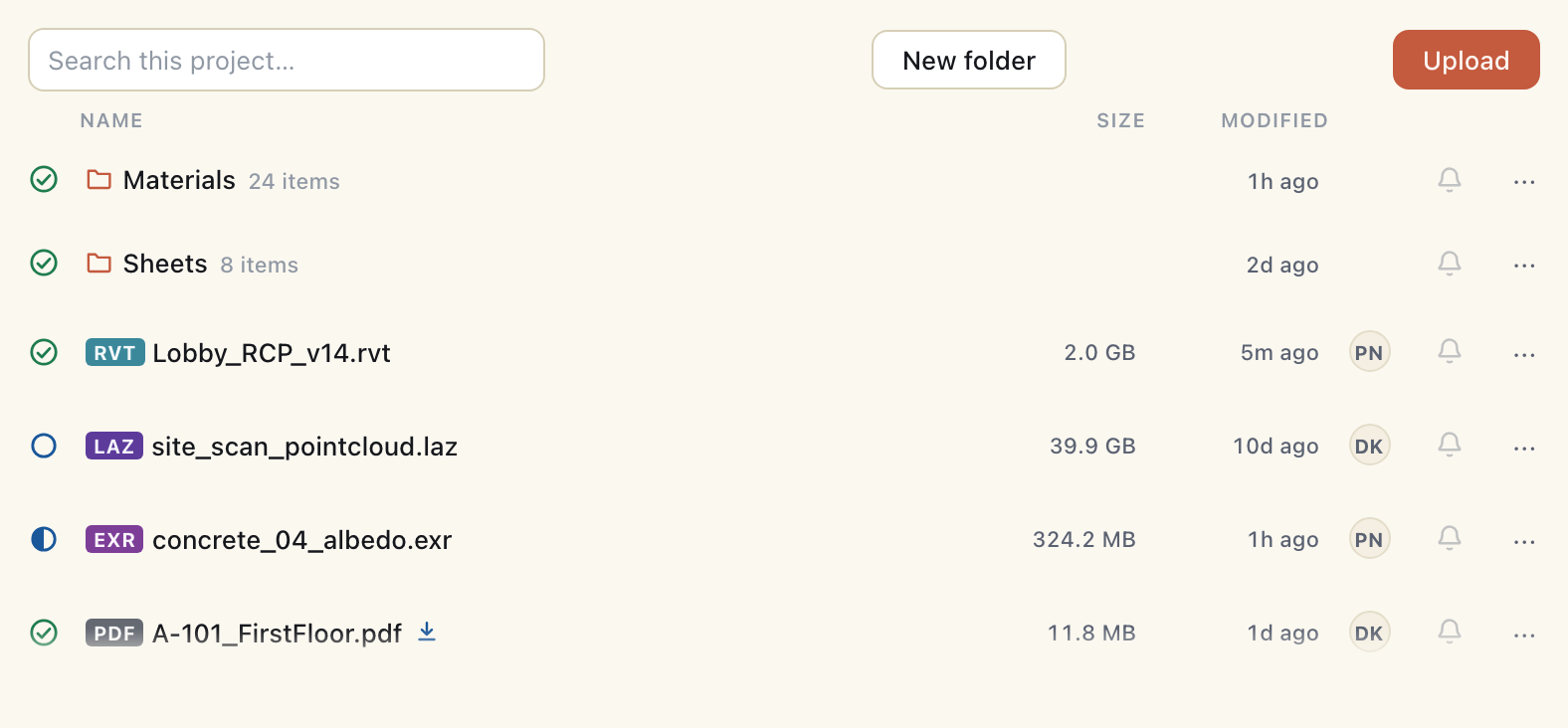
What’s actually on this machine
Every row shows exactly how much of a file lives on this machine right now - synced, partly cached, or still cloud-only. A 40 GB point cloud can sit at zero bytes on disk until someone actually opens it - no sync client to configure, no folder to babysit.
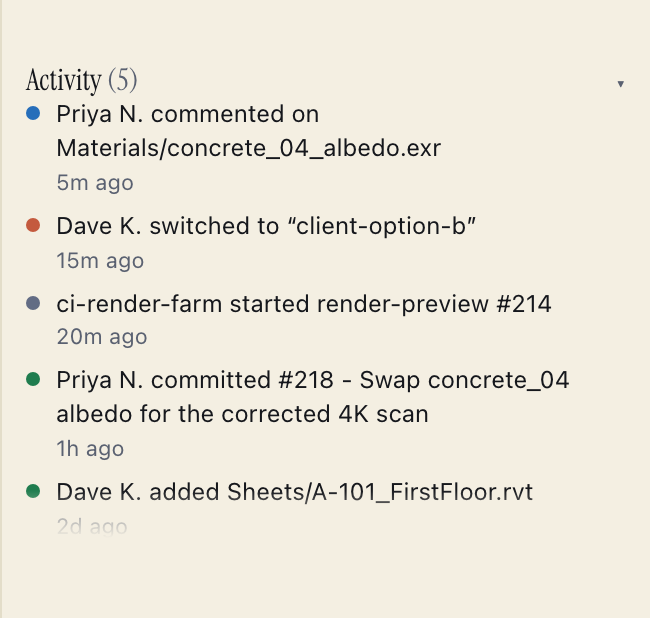
Real-time activity
A live, cross-machine feed of every commit, branch switch, comment, and CI run on the project - who did what, and when. No polling a shared drive to guess what changed since lunch.
Close the laptop on the train and keep working. Reconnect and your changes merge back - or you pick a winner. Never a silent lost edit.
Every change is versioned. Someone overwrites a file, or ransomware strikes? Roll the whole project back to any moment - and lock the bad actor out.
Real-time presence shows exactly who has a file open right now - not just who’s online. No more overwriting someone mid-edit.
Need a file someone else has locked? Request it in a click. They get a prompt; it hands over the moment they’re done. No Slack message, no waiting around.
Comment on any file and @-mention a teammate - internal or a guest reviewer - right where the work lives. No round-trip to email or a separate review tool.
Full-text search across every file, project, and person in your org - one search box, deep-linked results, no digging through folders.
Every file is encrypted with your project’s own key before it leaves your machine. Your footage and models stay yours. Need us locked out entirely? An opt-in end-to-end tier keeps your keys off our servers - see how.
Give a client or consultant read-or-comment access to one folder. Audit-trailed, revoked in a click - and it never costs a paid seat.
Migrate from S3, a NAS, or a local drive with one command - verified, resumable, with a full report. We’ll help you do it.
Studios and firms already running Swarmfile in production. Their feedback shapes every release.
“The first time our colorist opened the cut from her apartment in Berlin, the proxy range she scrubbed landed in under a second. We retired the LA ↔ Berlin shuttle drive the next week.”
“We're piloting on a 12-tower Revit central model across two offices. The byte-range lock is the part everyone said couldn't work.”
“Multi-GB CAD and Revit worksets between field laptops and the home office used to mean a courier. Now it's just there.”
Quotes shared with our partners’ permission. Names and logos will follow once they’re ready to go public.
Two ways in. Start a 7-day Pro trial - card on file, nothing charged until day 7. Or start on Starter, $5 a seat a month. Bring your own NAS; we’ll help you migrate.
Cancel anytime before day 7. No hard drives were harmed in the making of this drive.